Using WordPress as a content management system (CMS) for a web site is a great idea. You get both – static content via Pages and blog entries via Posts. However one may ask – how do you put it all together, given that some sites require drop-down menus?
Well, it’s pretty easy – WordPress coding functions allow you to have list of pages/subpages output anywhere on the page via:
wp_list_pages
The outcome of it is the unordered list, where each <li> tag belongs to a particular class ‘page_item’ with those being nested as a page tree. Active page <li> tag has class ‘current_page_item’.
The idea for the drop-down is simple – keep not-current lines hidden and ‘open’ current active pages subsection.
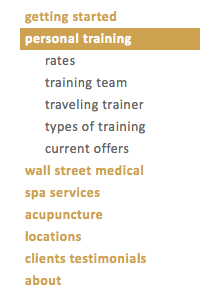
This is done via simple CSS coding on your theme’s style.css file:
li.page_item ul {display:none; margin-left:0px;}
li.current_page_item ul,li.current_page_parent ul {display:block; background: #fff;}
and to make it all look cute, we add some color and formatting:
#nav ul li {margin-left:0px;}
#nav ul li ul li {margin-left:10px;}

#nav a {color: #cda251; text-decoration: none; padding:5px; font-weight: bold; font-size:14px; letter-spacing: 0.5px}
li.page_item ul {display:none; margin-left:0px;}
li.current_page_item ul,li.current_page_parent ul {display:block; background: #fff;}
#nav li.current_page_item ul li a, #nav li.current_page_parent ul li a{color: #666; margin-left:10px; font-weight: normal;}

#nav li.current_page_item a, #nav li.current_page_parent a {color:white; font-weight: bold; }
#nav li.current_page_item, #nav li.current_page_parent {background-color:#cda251; }

#nav li.current_page_parent ul li.current_page_item {background: #fff;}
#nav li.current_page_parent ul li.current_page_item a {text-decoration: none;}
#nav li.page_item a:hover {text-decoration: underline; }
#nav li.page_item ul li.page_item a {color:#666; font-weight: normal; }
Now, because of our page listing function is listing current ‘child’ pages of the active page, we need to have it reversed, so that when clicked on the child page a parent one still stays on top and the subsection opens.
This involves a bit of the coding in the wordpress page template (page.php):
- taking care about this issue, by creating a condition on which when a child page for this parent is clicked the function still lists child pages of this parent. In the example below a parent post with the page id =4 will always stay on top, when one of its children’s pages is clicked:
if (
    $post->post_parent == 4
    OR $post->post_parent == 18
    OR $post->post_parent == 20
    OR $post->post_parent == 258
    OR $post->post_parent == 16
    OR $post->post_parent == 10
    OR $post->post_parent == 14
    OR $post->post_parent == 60
    OR $post->post_parent == 710
    OR $post->ID==4) $child="4";
- making sure our page listing function is done correctly:
<div id=nav>
        <ul>
          <?php wp_list_pages("title_li=&child_of=".$child); ?>
        </ul>
</div>
As a result, when you browse page tree only active section opens up, with the parent page being highlighted.
One step from it would be creating a drop-down menu where if you mouse over some parent element, the tree would open up showing its children. And it would be nice, if the tree would close, once you mouse away from this section.
Here we would need to use some jQuery help, by creating a conditional function, which would show or hide particular menu lines:
- be sure to load jQuery lib first:
<script src="http://code.jquery.com/jquery-latest.js"></script>
- create a function for the menu class and hoverOver action:
<script>
$(document).ready(function(){
$("li.page_item").hoverOver(
function(){
$(this).find("ul").show();
},
function(){
$(this).find("ul").hide();
$("li.current_page_parent > ul").show();
$("li.current_page_item > ul").show();
}
);
});
</script>
On some browsers you may get a situation when menu would open and close quite quickly, so that it creates a mess while browsing the tree. For this reason we will use hoverIntent function, done by brian@cherne.net, and replace a piece of our code with it:
 <script>

  $(document).ready(function(){
  $("li.page_item").hoverIntent(
      function(){
      $(this).find("ul").show();
    },
    function(){
       $(this).find("ul").hide();
       $("li.current_page_parent > ul").show();
       $("li.current_page_item > ul").show();
    }
    );
  });
  </script>
Now our list opens after a certain delay, creating pleasant browsing experience for your web site users.
3 Comments
Thanks for a great hack! I have several questions. Let me start with the first. Does the if statement needs to be in a separate page.php for each page? In my case, I was testing for page ID 28 and wrote the if statement like this to no avail:
if (
$post->post_parent == 28
OR $post->post_parent == 18
OR $post->post_parent == 20
OR $post->post_parent == 258
OR $post->post_parent == 16
OR $post->post_parent == 10
OR $post->post_parent == 14
OR $post->post_parent == 60
OR $post->post_parent == 710
OR $post->ID==28) $child=”28″;
It doesn’t make a difference with or without the above code. Maybe just a little more of an example page.php would be helpful.
Thanks!
Correct me if I’m wrong but it looks like this will only work 1 layer deep (only one child).
This was coded long time ago, so quite possible.
1 Trackback